Hostinger OpenClaw Review 2026 – The Future of Self-Hosted AI Agents

Artificial Intelligence is evolving fast but what if instead of relying on tools like ChatGPT or SaaS platforms, you could run your own AI assistant that works 24/7, fully under your control?

That’s exactly what Hostinger OpenClaw brings to the table.

In this guide, we’ll break down everything you need to know about OpenClaw on Hostinger from what it is, how it works, why it’s trending, and how you can use it to automate your work, business, or even daily life.

What is OpenClaw?

OpenClaw is an open-source, self-hosted AI agent that runs on your own infrastructure instead of a third-party cloud platform.

In simple words: It’s like having your own personal AI employee that:

  • Understands instructions
  • Remembers context
  • Performs real tasks

Unlike traditional AI chatbots, OpenClaw doesn’t just respond it acts.

It can do the task like:

  • Run commands
  • Automate workflows
  • Manage files
  • Interact with apps like WhatsApp, Telegram, Slack, and more

💡 What is Hostinger OpenClaw?

Hostinger OpenClaw is simply OpenClaw hosted on Hostinger’s VPS or managed environment.

But here is the difference:

Hostinger has made it extremely easy to deploy OpenClaw.

Instead of manual setup, you get:

One-Click Deployment : You can launch your AI agent instantly without coding or complex configuration.

Pre-Configured Environment

Built-in AI Credits : No need to manage APIs manually credits are pre-integrated

Why Use OpenClaw on a VPS (Instead of Local Setup)?

You can run OpenClaw on your computer but it’s not ideal. Here’s why VPS hosting (like Hostinger) is better:

1. 24/7 Availability

Your AI runs continuously even when your system is off.

2. Better Performance

Dedicated resources = faster execution

3. Improved Security

Isolated environment reduces risk compared to personal systems

4. Scalability

Easily upgrade resources as your needs grow

How Hostinger OpenClaw Actually Works

One Click, Genuinely

When you go to Hostinger’s OpenClaw page and click “Get OpenClaw,” you’re not being dropped into a complex setup wizard.

Hostinger spins up a pre-configured Docker container with everything already inside it — the OpenClaw software, the security gateway, the AI credits, all of it.

By the time you’ve set up billing and chosen your server location, the assistant is already deploying in the background.

This is built on Hostinger’s VPS (Virtual Private Server) infrastructure, which means your OpenClaw instance gets its own dedicated slice of computing power — guaranteed CPU, memory, and a stable network connection.

Unlike running an AI tool on your laptop, a VPS stays online 24/7 whether you’re at your desk or sound asleep.

No API Keys, No External Accounts

One of the historically painful parts of setting up an AI assistant was getting API access from multiple providers. You’d need an OpenAI account, an Anthropic account, maybe a Google account each with its own billing, its own key management, and its own potential for things to break.

Hostinger sidesteps all of that through their integration with nexos.ai, which bundles AI credits that work across multiple models. You buy credits directly inside hPanel (Hostinger’s control panel), and your OpenClaw instance is immediately connected to OpenAI, Anthropic, Google, and others no external sign-ups required.

The credits don’t expire and only get used when the AI is actually responding to something, which makes budgeting predictable.

When you need more credits, you top them up from the same dashboard. It’s the kind of seamless experience that sounds obvious in hindsight but takes real engineering to pull off.

Security That’s Already Done For You

Privacy is a big reason people choose self-hosted tools in the first place. OpenClaw lets you keep your conversations and data on your own server rather than on a shared platform.

Hostinger takes this further by running each OpenClaw instance inside its own isolated Docker container, so your data is completely separated from other users on the same infrastructure.

Each instance also gets a high-complexity security gateway token generated automatically on setup. You don’t configure this, it’s just there, protecting your dashboard from unauthorized access from the moment you log in.

On top of that, Hostinger’s managed infrastructure handles DDoS protection, malware scanning, and automatic backups. If a new stable version of OpenClaw is released, you can update with one click. No manual patching required.

What Can You Actually Do With It?

This is where things get genuinely exciting. Once OpenClaw is running, the possibilities are surprisingly broad. Here are some of the most popular ways people use it:

Customer support automation. Connect OpenClaw to your business WhatsApp or Telegram number and it can handle incoming customer inquiries automatically, giving consistent, context-aware responses around the clock. You set the rules; it handles the volume.

Daily briefings and news digests. Ask OpenClaw to send you a personalized news summary every morning at 8 AM based on your interests. It’ll ask you a few setup questions, topics, preferred sources, delivery format and then handle it automatically from there.

Task automation and reminders. You can give OpenClaw ongoing tasks using plain language. Something like “every Sunday evening, send me trending keywords in my industry” becomes a scheduled, recurring job without any coding.

Personal knowledge assistant. Because OpenClaw runs continuously and maintains context, it can function as a persistent AI assistant that you interact with through WhatsApp just like you’d chat with a colleague, except it never forgets your preferences and is always available.

Business chatbots. Product and operations teams use OpenClaw to build intelligent bots that handle inquiries across multiple platforms simultaneously, maintaining consistent responses regardless of which channel a customer reaches out through.

Two Ways to Deploy: Which One Is Right for You?

Hostinger offers two distinct paths for running OpenClaw, and understanding the difference will help you pick the right one.

1-Click OpenClaw (Managed)

It is the option for most people. Hostinger handles everything like server management, security patches, updates, backups. You interact entirely through hPanel. If you’ve never touched a server before, this is where you start.

OpenClaw on VPS (Self-Managed)

It gives you root access and full control over the server environment. You deploy OpenClaw using Hostinger’s pre-configured Docker template through the Docker Manager in hPanel which is still much easier than doing it entirely from scratch but you’re responsible for your own maintenance and security hardening. This option makes sense if you’re a developer who wants to install additional software alongside OpenClaw, customize container configurations, or just prefers having direct control.

The functionality of OpenClaw itself is identical in both cases. The difference is purely about who manages the infrastructure underneath it.

Setting Up OpenClaw on Hostinger

  1. Go to hostinger.com and navigate to the OpenClaw section (under VPS or via direct search).
  2. Choose your plan. For most users, the 1-Click OpenClaw plan is the right choice. For the VPS path, KVM2 or higher is recommended.
  3. Optionally add AI credits (nexos.ai) during checkout. You can also add web browsing credits via Oxylabs AI Studio.
  4. Complete your purchase. Hostinger begins deploying automatically.
  5. In hPanel, go to the OpenClaw section and follow the onboarding flow. Connect your WhatsApp or Telegram by scanning a QR code.
  6. Start chatting. Your AI assistant is live.

The entire process from purchase to first message typically takes under ten minutes, even if you’ve never used a VPS before.

Pros and Cons of Hostinger OpenClaw

Pros

  • Easy one-click setup
  • Full control over AI
  • 24/7 automation
  • Multi-platform integration
  • Scalable infrastructure

Cons

  • Requires basic technical understanding
  • Security risks if misconfigured
  • Ongoing VPS cost
  • Dependency on hosting environment

Hostinger OpenClaw Coupon Code

To make this setup even more affordable, you can use a Hostinger OpenClaw VPS Coupon and significantly reduce your initial hosting cost while still getting access to the same powerful infrastructure.

These coupons are especially useful if you’re just starting out and want to experiment with your own AI agent without committing to high upfront expenses.

Combined with Hostinger’s already competitive pricing, a valid VPS discount lets you deploy OpenClaw, test automations, and scale your AI workflows at a fraction of the usual cost, making it a smart entry point for developers, entrepreneurs, and anyone looking to build a self-hosted AI assistant on a budget.
Hostinger Agency Hosting Coupon, Plans, Pricing & Review

Are looking for the hosting where you can manage multiple clients websites in easy to use dashboard? Are you freelancer, developer or agency having multiple client websites and looking for the single account to manage all these websites? then Hostinger Agency hosting is the best option for you. Here we have tried to give detail in terms of Agency hosting coupon, plans with pricing and detailed review.

Hostinger Agency Hosting Coupon Code

With the latest and verified Hostinger Agency Hosting coupon code listed here you can save extra 10% on final price. Use below listed various coupon code to save money.

Hostinger Agency Hosting Coupon Code – Startup Plan

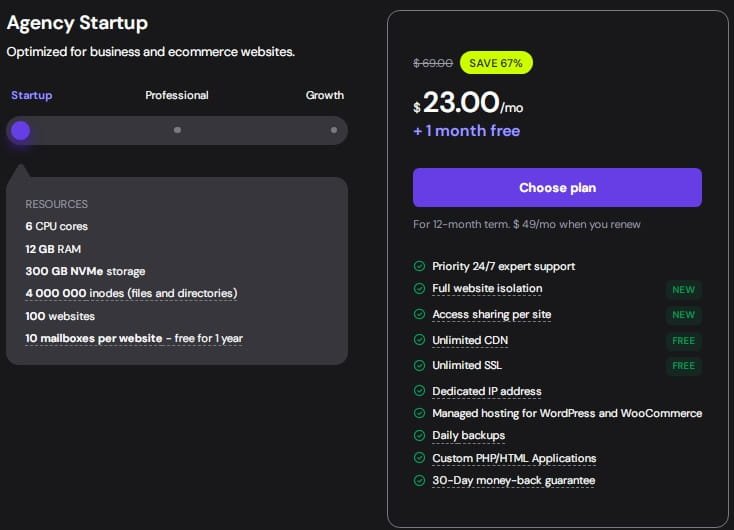
Use our exclusive coupon code for the Hostinger agency hosting startup plan to avail 10% discount. You can avail this plan at $23/month.

More Less

Expires on: 31-12-2026

Agency Professional Plan – for Bigger Projects

Agency professional hosting is best for the bigger projects. It cost around $49/month. you will also get 1 month free.

More Less

Expires on: 31-12-2026

Agency Growth Plan – 37% OFF

Get 37% off on Hostinger Agency growth plan.  This plan starts from $69/month. It comes with 10 CPU cores, 3GB RAM, 700 GB NVMe storage and more. Use coupon code to save extra 10%.

More Less

Expires on: 31-12-2026

How to use Hostinger Agency Coupon Code?

In order to use and apply Hostinger Agency hosting coupon code simply follow the below steps.

Step 1: Copy the coupon code listed above. select coupon as per the plan mentioned.

Step 2: After copying code, visit the Hostinger Agency Hosting page to purchase. Here you can see the three plans namely Startup, Professional and Growth.

Hostinger Agency Hosting

Step 3: You can select plan as per your needs and click on choose plan. This will redirect you to cart page where you can select tenure either 1 month or 12 month.

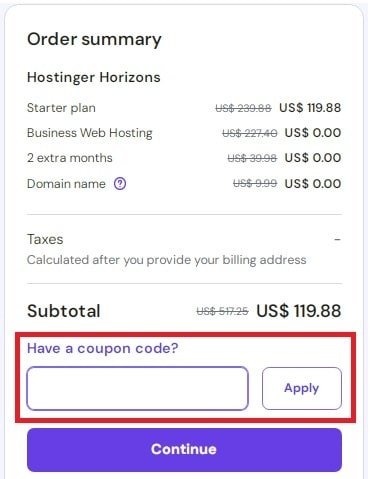
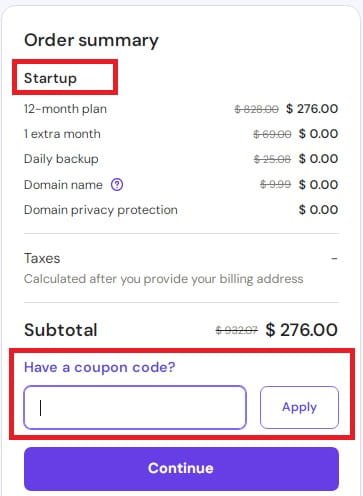
Step 4: On the right side you can see the order summary where you can enter coupon by clicking the link “Have a coupon code”.

Hostinger Agency Hosting Coupon

Step 5: Add the copied coupon and click on apply button. and at last proceed for the checkout.

This way you can use and apply the hostinger coupon code for the agency hosting plans.

Price Comparison of Hostinger Agency Hosting Plans

Hostinger Agency comes with various plans like Startup, Professional and Growth. All these plans comes with 30 days money back guarantee. Below table shows the comparison between various plans with its pricing.

Frequently Asked Question

What is Hostinger Agency Hosting?

Hostinger’s Agency Hosting is a type of web hosting specially designed for the freelancers, agencies, developers and professionals who is having multiple clients. With this plan it is easy to manage multiple clients websites from single dashboard.

How Many Websites Can I Host On an Agency plan?

You can host 100 to 300 websites depending upon the plan you purchase.

What Are The Features Included With Each Plan?

All plans comes with following developer tools and features.

  • SSH & WP-CLI for Faster Site Management
  • SFTP Account Management for Secure Team Access
  • PHP Version Management Offers Better Performance
  • Free Safe Staging Environments
  • 1-Click Website Cloning
  • Redirects Manager Preserves SEO
  • Cron Jobs Automate Tasks
  • Free Malware Scanning
  • Unlimited Collaborators

Is it Possible to Migrate My Existing Websites to Agency Hosting Plan?

Yes. You can migrate unlimited websites to agency plan without any cost. Hostinger also ensure the downtime while migrating your website. You can select the option to migrate the website while adding a website in the dashboard.

Any Special Support Priority?

Yes – Agency hosting plan comes with 24/7 support priority from the experts. They ensures the faster response time compared to standard plans. You will get all types of supports like selecting plans, website migrations, backups, troubleshooting or any other technical support if needed.

What About Money Back Guarantee?

Like other hostinger plans, Agency hosting plans also comes with 30 days money back guarantee. So within 30 days of span if you feels not satisfied then you can cancel the plan and request for the refund.

Other Hostinger Coupon Codes

Hosting Cloud Hosting Coupon

Hostinger Horizons Coupon Code

Hostinger India Coupon Code

Hostinger VPS Hosting Promo Code

Hostinger Pakistan Coupon

Hostinger Horizons Coupon Code

Are you searching for the latest and verified Hostinger Horizons Coupon Code? Don’t worry, here we have listed coupon codes that are manually verified and tested that will give you up to 10% extra discount on all Horizons plans. Simply click on coupon code, copy the code and follow the link given in coupon to apply this code. Below are the latest promo codes.

10% Coupon Code : All Hostinger Horizons Plans

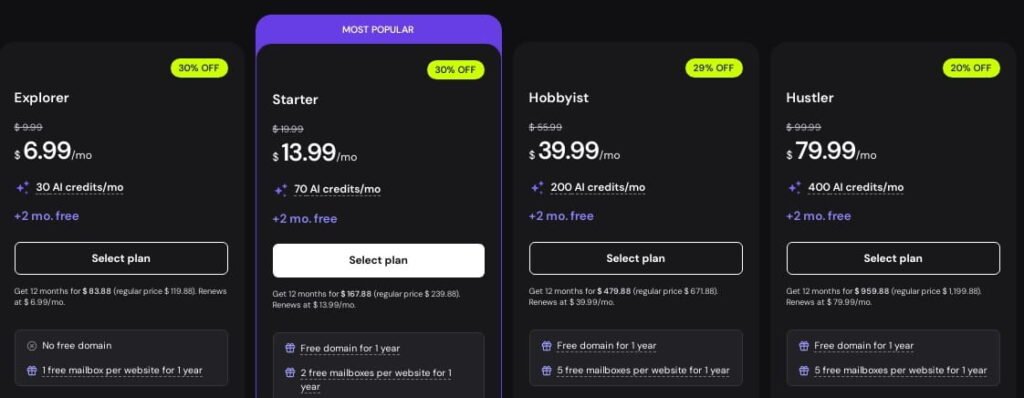
Save an extra 10% on all Hostinger Horizons plans by applying this coupon code at checkout. It works on Explorer, Starter, Hobbyist, and Hustler plans. It helps you build AI-powered websites at a lower price.

More Less

Expires on: 30-06-2026

Explorer Plan Coupon Code – Extra 10% Off

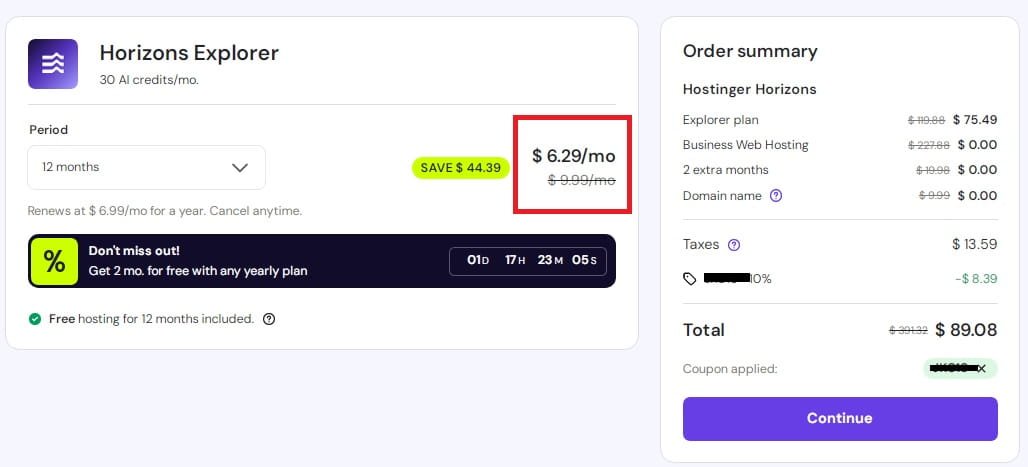
Use this Hostinger Horizons Explorer plan coupon to get the plan for $6.29/month (was $6.99) with 2 months free. Build 1 website, manage users and data, and create SEO-optimized projects that can be discovered by AI tools.

More Less

Expires on: 30-06-2026

Hostinger Horizons Promo Code for Starter Plan

Use Hostinger Horizons Starter promo code to get the plan for $12.59/month (actual price is $13.99/month) with 2 months free and 70 AI credits every month. You can build up to 25 websites, sell products or subscriptions, and enjoy priority 24/7 support plus a free domain for 1 year.

More Less

Expires on: 30-06-2026

Hobbyist Plan Coupon Code

Get the Hostinger Horizons Hobbyist plan for $35.99 ($39.99/month before discount) with 2 months free using this coupon code. It includes 200 AI credits every month to build and experiment faster.

More Less

Expires on: 30-06-2026

Hustler Plan : 20% + 10% Extra OFF

Get 20% Off plus extra 10% discount on Hostinger Horizons Hustler plan. Plan starts from $79.99/month with 400 AI credits every month.

More Less

Expires on: 30-06-2026

How to Apply the Hostinger Horizons Coupon Code

In order to apply the Hostinger Horizons coupon, you can simply follow these steps.

Click on coupon code given above and copy the code. Then visit this Horizons page directly.

Select the plan that best suit your needs by clicking “select plan” button. This will redirect you to Cart page.

Hostinger Horizons coupons for plans

On the Order summary, there is a link “Have a coupon code?”. Click on that link and add coupon copied from above. And you will find that discount is applied with 10% off.

Hostinger Horizons Coupon Code

After Adding coupon code, just click on continue this will ask for the registration. You can register via gmail or via GitHub.

Hostinger Horizons Plans and Pricing

Here is the list of Hostinger Horizons plans with its price and features. You can also use coupon code mentioned above to get extra 10% off.

Horizons Pricing after Discounts

Here below mentioned image is showing proof of discount users will get after applying our exclusive coupon code.

Hostinger Horizon Coupon Proof

Difference Between Hostinger Horizons and Hostinger Website Builder

Hostinger Horizons

  • Hostinger Horizons used to create website like website builder but it is using no-code AI to generate the code based web applications by simply giving prompt to the application.
  • Best for : Building custom web application
  • You can build app without writing code
  • Deploy live apps instantly
  • Cons : You interact with AI Prompts rather than easy drag and drop

Hostinger Website Builder

  • While Hostinger Website Builder provides drag and drop functionality to create the website. It also includes built in SEO features.
  • Best for: Standard websites like blogs, business website, portfolio and simple online stores.
  • Beginner friendly
  • Built-in SEO tools, templates for websites, AI writing and more.
  • Cons: Sometimes template switching in limited.

Frequently Asked Questions

Does coupon listed here are for all the plans?

Yes. Coupon that we have listed here are applicable to all the hostinger horizons plans like Explorer, Starter, Hobbyist and Hustler.

How much does Hostinger Horizons cost?

Hostinger Horizons plan starts from $6.99/month. But you can use our exclusive coupon code listed above that will give you extra 10% off.

What can you build with Hostinger Horizons?

With hostinger horizons you can build web apps in few minutes without coding knowledge. You just need to give prompt and it will create application for you.

Is there any refund policy on Hostinger Horizons plans?

Yes. Hostinger comes with 30 days money back guarantee. For refund there are certain conditions like if you have published or exported your project then you will not get refund.

Other Hostinger Services Coupon Codes

Hostinger Coupon Code India

Hostinger Pakistan Coupon Code

Hostinger KVM VPS Coupon Code

Hostinger Cloud Hosting Coupon

Hostinger Agency Hosting Promo Code